Photo Referencing
Define initial data and calibration options to reference photo and allow positioning.
This screen is available from Photo View Menu | Photo Referencing.
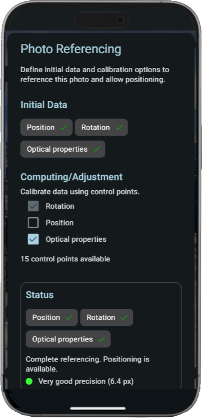
Initial Data
Check and edit the initial positioning data.
The initial positioning data is used as is when no control points are available. When using control points, it's used as a prior and it's kept, adjusted or computed according to the selected computing/adjustment options and to the available control points.
When you import photos from DSLR or drone (in Veezer Plus), some initial data may be missing. If you can, adding missing data will ease positioning and will save control points creation.
Position
The camera position.
When the photo is acquired in Veezer, the position is automatically set from the phone GPS.
Available options:
- Clear: remove the data, thus it will be computed only from control points.
- Reset: restore the initial data if any.
- Edit: open a popup to view and edit position.
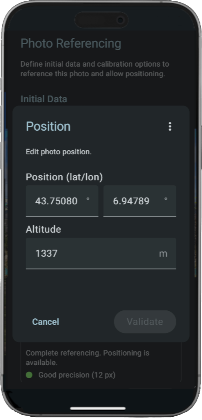
Enter the cartographic position with latitude, longitude, and altitude.
Import/export from GPX point and copy/paste actions are available from menu.
Rotation
The camera rotation angles.
When the photo is acquired in Veezer, the rotation is automatically set from the phone orientation sensors.
Available options:
- Clear: remove the data, thus it will be computed only from control points.
- Reset: restore the initial data if any.
- Edit: open a popup to view and edit rotation.
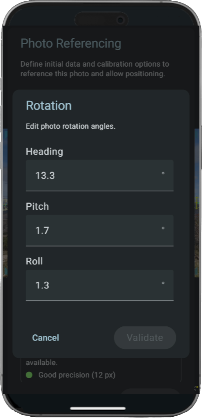
Enter the azimuth, pitch and roll angle in degrees.
Optical Properties
The photo camera model.
When the photo is acquired in Veezer or imported (in Veezer Plus) it's automatically set by priority: from default calibration data, from app camera database, or from photo metadata.
Available options:
- Clear: remove the data, thus it will be computed only from control points.
- Reset: restore the initial data if any.
- Edit: open a popup to view and edit optical properties.
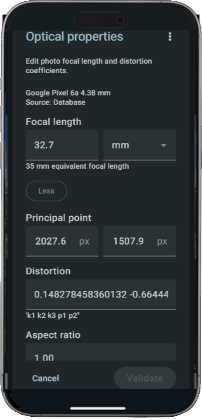
Enter the focal length and other optical properties:
- Focal length: in pixel equivalent for a 35 mm or in pixels
- Principal point: x and y in pixels
- Distortion parameters: k1 k2 k3 p1 p2
- Aspect ratio
Find in calibration data (in menu): set the optical properties from your calibration data.
Computing/Adjustment
You can specify how to adjust or compute photo positioning using control points:
- Rotation
- Position
- Optical properties
According to the selected options you need from 1 to 6 control points.
When you import photos from DSLR or drone (in Veezer Plus) with missing initial data, computation is required and set by default.
Adjusting optical properties should not be used if your camera has been calibrated properly.
Status
Check the current positioning data and estimated precision.
Check carefully the status: it provides valuable information about precision, and recommentation to improve photo positioning.