New Photo
Take a photo with your phone.
This screen is available from main screen New Photo button.
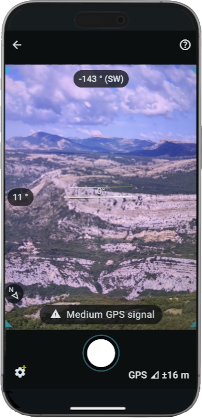
Choose a location with a clear view of your route and take a photo.
The ideal shooting distance ranges from 500 m to 3 km (from 1500 ft to 2 mi).
- Select camera (Veezer Plus)
- Check GPS position precision
- Adjust the shot
- Trigger photo
The photo is automatically added to your gallery.
Use this photo to locate yourself during your journey.
See also Photo View
Display
The following information is displayed with the photo preview:
- Azimuth angle
- Pitch angle
- Roll angle, displayed when relevant
- GPS signal
The central spirit level can be used as a visual hint to limit pitch and roll angles.
Settings*
Click Settings button to select camera.
(*) with Veezer Plus subscription
Take a Photo
Click Trigger button to take a photo.
Photos are taken directly in the app. All shooting parameters are saved.
Check that the GPS position is accurate enough before taking the photo, wait a few seconds if necessary.
To optimize orientation sensor accuracy, hold the position of the phone when shooting.
The angle of the shot doesn't affect the positioning accuracy, but you can use the levels if you want to get a horizontal image.