Share a Photo
Tips and tricks to share a photo.
Share a Photo for Veezer, to allow other users to use that photo in the app.
A Veezer photo file has OVZ file extension and is stand alone. Veezer photo recipients need Veezer to open it.
The photo is shared with all the positioning parameters and drawings: recipients will be able to use it directly to locate themselves.
Prepare your Photo for Sharing
- Complete photo referencing: it's better if the photo positioning is completed, end-user will just have to open the photo and use it for loalisation.
- Add caption: it will help end-users to identify the photo. Caption can have several lines and you can use it to include credits.
- Set read-only: it avoids end-users unexpected edition.
- Set drawings visibility according to your preference. Note that control points are automatically hidden in shared photos.
Share your Photo
Click Share button from Photo View or from the main screen on a selected photo.
Select Photo for Veezer.
Veezer photos are quite compact and can be shared easily as any media: whatsapp, mail, cloud, publication on a web site.
With Veezer Plus subscription, you can protect the shared photo with Protect Content option.
Protect Content*
Options | Protect content
Activate this option to publish your production securely, by limiting modification and copy rights on your shared photo.
Restricted modifications:
- Photo referencing cannot be changed: control points and adjustment options are read only
- Original drawings cannot be edited
- Photo caption cannot be changed
Restricted copy:
- Sharing standard photo is not allowed
Protected photos are tagged with a shield icon in the gallery and are displayed with a "Protected" status.
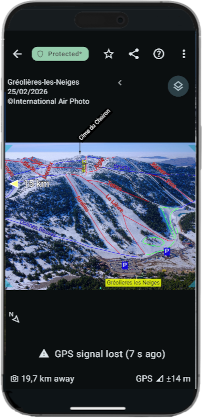
Users are allowed to add drawings and annotations on protected photos. All modifications are done in the User drawings layer.
Photos with user drawings are displayed with a "Modified" status and clearly state that user additions do not bind the original author.
(*) with Veezer Plus subscription